The dongs are not playing or downloading
Hello, it’s been a couple of months since I last used your app and now nothing works.
When I try to play a song, it’s stuck at 0s and it doesn't play, when I try to download a music there is a red question mark signaling that there was an error but impossible to know what is the error.
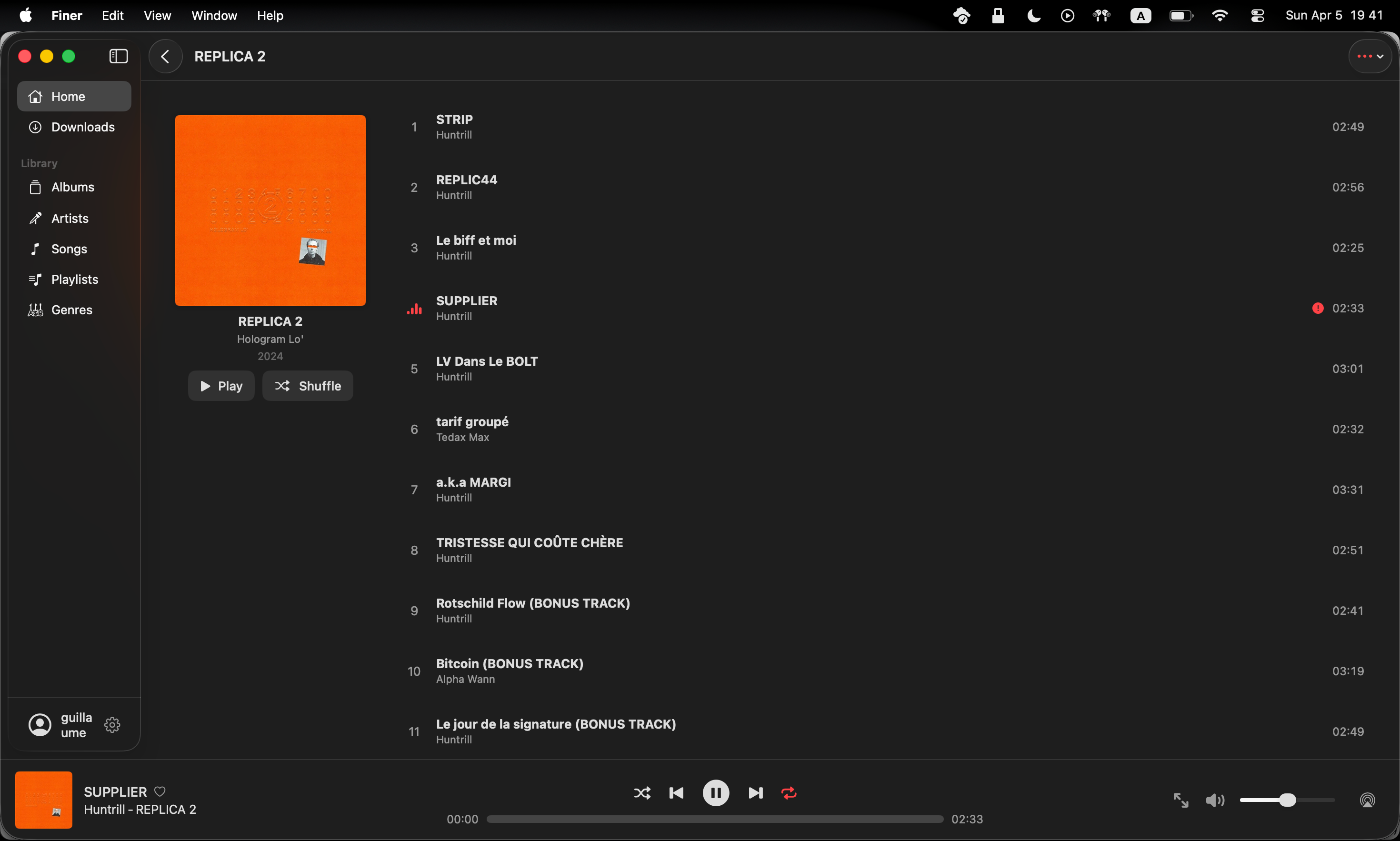
It’s happening on Mac and iPhone, both running the latest version of MacOS and iOS.
The music still works fine on the official Jellyfin app, website and other
If the error is on my side, can you please put an option to the logs or the error message ?
Thanks for reading my post, and sorry if my English isn’t perfect, it’s not my main language.
Log in to comment and vote
Comments9
paultrebor
Apr 16
Hi! I appear to be having the same problem. I’m on Jellyfin 10.12.0 and iOS 26.4.1. Finer will connect to Jellyfin when I try to play a song. On the Jellyfin dashboard this shows up as the client connecting and playing back the song (the timer is advancing). In Finer, however, nothing happens. Playback is not commencing and the timer isn’t advancing. This is independent of filetype. The other player that I’ve tried (Manet) plays back fine. I have already reinstalled Finer, but that didn’t address the issue.
Duan Wen
Apr 6
Hi @Guillaume Favier , this seems to be related to login expiry, could you try sign in again ?
Guillaume Favier
Apr 6
Hello,
Thank you for your reply but unfortunately it doesn’t work …
The same thing on both Mac Air M2 and iPhone 12 Pro. (Both updated to the latest stable release of iOS and macOS)
Bonus info :
The music file is a 16bit flac at 44.1kHz
Duan Wen
Apr 6
interesting, I think many of the users are using flac (including me) and this is the first time I see such issue. Could you share your Jellyfin server version as well ?
In the worst case, you could turn on transcode for both stream and download and it should work.
Guillaume Favier
Apr 6
While transcoding, the problem is still there (for Streaming and download).
I’m on server ver. 10.12.0 on archlinux (and web ver.10.11.8 but irrelevant here).
Is there any way to check the logs from the Mac or iPhone app ?
Because I don’t know how to corner the bug.
on the jellyfin dashboard it shows that it’s trying to play but thing more. (the ip is because of a revers proxy)
Guillaume Favier
Apr 6
If you want I can message you an account to my jellyfin server if you want to diagnose it yourself
EDIT :
here is my public PGP key, send me yours and I can give you your username/password address
-----BEGIN PGP PUBLIC KEY BLOCK-----
mDMEadQUmRYJKwYBBAHaRw8BAQdAjXEOaBfwLA6fvOhqbHdMkoVfMFaFxDDv89j1
mnCCFHq0CUd1aWxsYXVtZYi1BBMWCgBdFiEEFIh7pHXMShjx+Zg5mtWu32X1XtcF
AmnUFJkbFIAAAAAABAAObWFudTIsMi41KzEuMTIsMCwzAhsDBQkB4TOABQsJCAcC
AiICBhUKCQgLAgQWAgMBAh4HAheAAAoJEJrVrt9l9V7XamsBAOMlu8i3l0ksrP2F
IbiPfRZRvyi7/ufiBWp2syc+eaYnAP9AvPpHeK/u/12Mog7dC4+jEwjyiBDmR6gF
HIBi/RS4D7g4BGnUFJkSCisGAQQBl1UBBQEBB0C/m0ARlOrQjgGoePlV4cmXRnJD
meBl4HkwBhcoitEUdwMBCAeImgQYFgoAQhYhBBSIe6R1zEoY8fmYOZrVrt9l9V7X
BQJp1BSZGxSAAAAAAAQADm1hbnUyLDIuNSsxLjEyLDAsMwIbDAUJAeEzgAAKCRCa
1a7fZfVe1yeJAQCAKR96DwmVpX9foNyzIeewD2PdAduB+ELAIWhhcNadCQD+P8wc
E1B6tPlz7a0J8lpbkvaJY3u//m+m9OJWtEH0WgaYMwRnBDXRFgkrBgEEAdpHDwEB
B0DmKTKmPIXsNIb1XQjq6/01/AxlyHsp0Ue/dTFnTnBmILQvR3VpbGxhdW1lIEZh
dmllciA8ZmF2aWVyLmd1aWxsYXVtZTAyQGdtYWlsLmNvbT6ImQQTFgoAQRYhBPzf
XPp4wi9fdNR09RssrUpTQgRNBQJnBDXRAhsDBQkFo5qABQsJCAcCAiICBhUKCQgL
AgQWAgMBAh4HAheAAAoJEBssrUpTQgRNt1cBAPvA/Jfb6hhbtJk/kM4uJvIUsi1N
KsqoUryuhEAIH1svAQCcI3w5GKD9LeEkuxnpaksWESECZ1RNVzjDaqVN2NyVB7g4
BGcENdESCisGAQQBl1UBBQEBB0BEl+BJOqy/xx2gYbOOoDtoe1Yfm2M/zL8qjipS
sriFXQMBCAeIfgQYFgoAJhYhBPzfXPp4wi9fdNR09RssrUpTQgRNBQJnBDXRAhsM
BQkFo5qAAAoJEBssrUpTQgRNwk8A/3ULG4hJET8oKpBw5ExhfHz4LqP8IMfXpsH6
Tk/fM9jbAP9wecBKOKB4jVVqCFO7gwH/h/9O9DXLn++8stanM3Y6DA==
=I4dH
-----END PGP PUBLIC KEY BLOCK-----
Duan Wen
Apr 7
Hi, I don’t think Jellyfin has 10.12.0 released yet.
For logging on mac, one thing you could try is open up Console app and filter by process like this:
There’s not much application level logging though, I could improve that.
Guillaume Favier
Apr 7
$ jellyfin --versionIn the console app there is a lot of info but I can show you this :
CFPrefsPlistSource<0x1052c51b0> (Domain: com.monk-studio.jellyfin-music, User: kCFPreferencesCurrentUser, ByHost: No, Container: (null), Contents Need Refresh: Yes): Attempting to store >= 4194304 bytes of data in CFPreferences/NSUserDefaults on this platform is invalid. This is a bug in Finer or a library it uses.Description of keys being set:p{85}8: data value, size: 946Description of keys already present:o{19}y: string value, approximate encoded size: 5388128p{85}8: data value, size: 946l{10}s: data value, size: 163l{9}g: data value, size: 132N{23}w: string value, approximate encoded size: 122N{63}w: array value, count: 2, tested nested objects: 2, approximate encoded size: 101a{9}n: data value, size: 90c{8}D: data value, size: 38N{46}w: string value, approximate encoded size: 29l{6}e: data value, size: 10...Total keys: 22 - Average approximate value size: 244991 byteswitch was the only message labeled as “FAULT”
and also :
Update NavigationRequestObserver tried to update multiple times per frame.but I don’t think this is related
Duan Wen
Apr 8
This error message is a useful one, likely the local storage is bloated. This has been optimized recently (migrated the storage to file system) but old data might be still there, so I guess re-install the app can help
That’s weird, the latest version for arch should be 10.11.8:
https://archlinux.org/packages/?name=jellyfin-server